
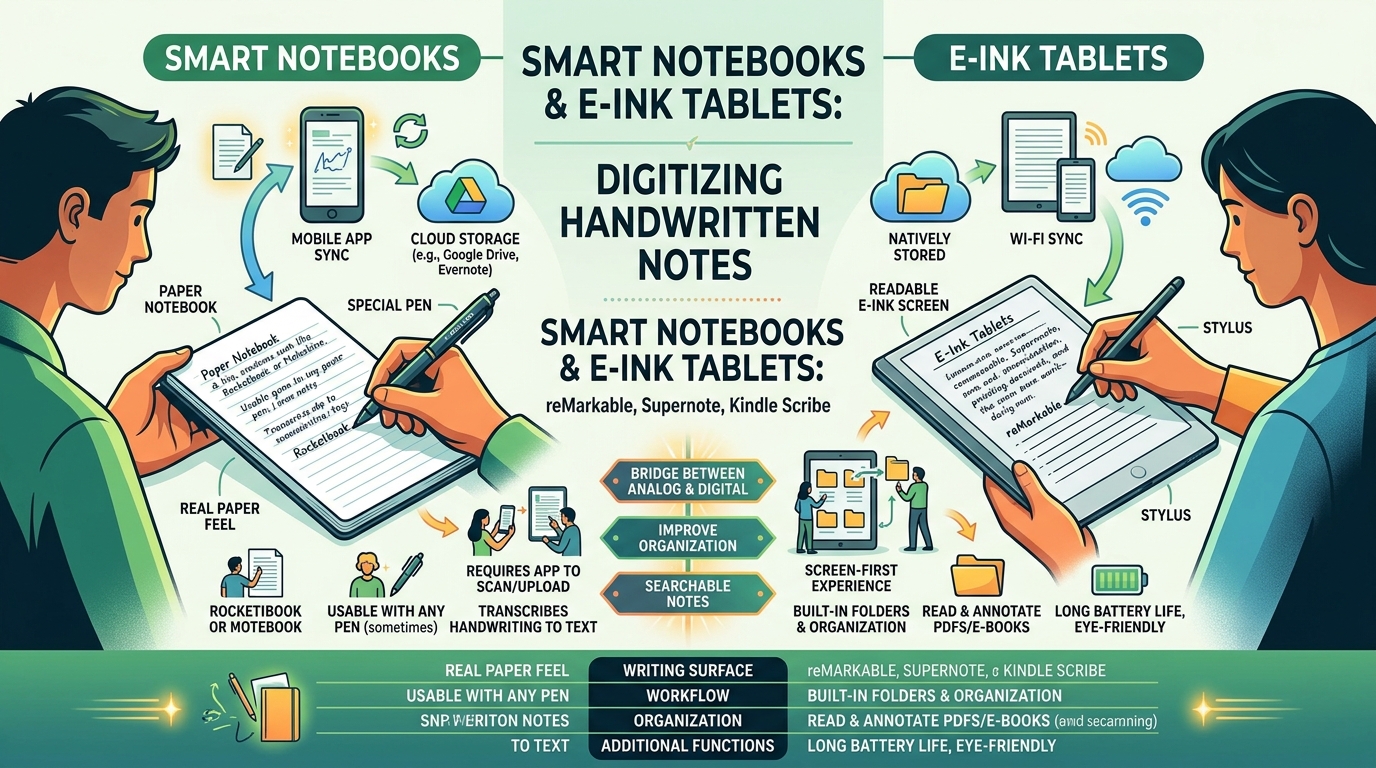
Have you ever found yourself buried under piles of notebooks, struggling to keep track of your handwritten notes? The constant battle of organizing, searching, and carrying around numerous paper notebooks can be both physically and mentally exhausting. Not to mention the frustration of losing important notes or not being able to access them when you need them the most. This common dilemma faced by students, professionals, and creatives alike highlights the need for a more efficient and modern solution to digitize handwritten notes seamlessly.
Imagine the convenience of having all your handwritten notes neatly organized and easily accessible with just a few taps on a sleek electronic device. No more cluttered desks, no more frantic searches for that one crucial piece of information, and no more worries about losing your valuable notes. Smart notebooks and E-ink tablets offer a revolutionary solution to this age-old problem, bringing the traditional art of handwritten note-taking into the digital age. By combining the tactile experience of writing on paper with the convenience of digital storage and organization, these innovative devices provide a seamless and efficient way to capture, store, and access your handwritten notes anytime, anywhere. Say goodbye to the chaos of paper notebooks and embrace the future of note-taking with smart notebooks and E-ink tablets – your ultimate tools for digitizing handwritten notes.
Benefits of Smart Notebooks
Smart notebooks offer a range of benefits that make note-taking more efficient and convenient. One key advantage is the ability to digitize handwritten notes instantly, allowing users to access their notes across multiple devices and easily share them with others. Smart notebooks also often come with features like cloud storage integration, handwriting recognition, and search capabilities, making it easier to organize and find specific notes. Additionally, many smart notebooks are reusable, allowing users to save paper and reduce waste over time. Overall, smart notebooks can streamline the note-taking process, enhance productivity, and provide a more environmentally friendly alternative to traditional paper notebooks.
Best Apps for Note-Taking
When it comes to note-taking, having the right app can make a significant difference in your productivity and organization. There are several top-notch apps available that cater to different preferences and needs. Some popular options include Evernote, which offers robust organizational features and cross-device syncing, making it easy to access your notes from anywhere. On the other hand, Notion provides a versatile platform for creating various types of content, from notes to project plans. For those who prefer a more minimalist approach, Simplenote offers a clean and straightforward interface for quick note-taking. Ultimately, the best app for note-taking will depend on your specific workflow and requirements, so it’s worth exploring different options to find the perfect fit for your needs.
Benefits of Smart Notebooks
Smart notebooks offer a range of benefits that enhance note-taking and organization in the digital age. These innovative devices combine the convenience of traditional pen and paper with the power of digital technology, allowing users to seamlessly transfer handwritten notes to their digital devices. By digitizing notes, users can easily search, edit, and share their content, improving productivity and collaboration. Smart notebooks also often come with features such as cloud storage integration, automatic syncing, and handwriting recognition, making them versatile tools for students, professionals, and creatives alike. Additionally, the ability to access notes from anywhere and easily back up information adds an extra layer of security and convenience to the note-taking process.
Comparison of E-Ink Tablets
E-Ink tablets, known for their paper-like display and long battery life, provide a unique alternative to traditional tablets for note-taking and reading. These devices offer a glare-free screen that mimics the look of real paper, reducing eye strain and providing a more comfortable reading experience. E-Ink tablets excel in outdoor environments and are ideal for extended reading sessions. While they may lack the color and multimedia capabilities of traditional tablets, they make up for it with their battery efficiency and readability in various lighting conditions. When comparing E-Ink tablets for note-taking, factors such as screen size, responsiveness of the stylus, and compatibility with note-taking apps should be considered to find the best option for individual needs.

Comparison of E-Ink Tablets
E-Ink tablets are known for their paper-like display that reduces eye strain and mimics the experience of writing on actual paper. These devices offer excellent battery life, often lasting weeks on a single charge, making them ideal for long note-taking sessions or reading sessions. E-Ink tablets are also lightweight and portable, making them convenient for students, professionals, and anyone who prefers a distraction-free digital writing experience.
How to Choose the Right Device
When selecting a note-taking device, consider factors such as the intended use, budget, desired features, and compatibility with other devices. Think about whether you prefer a dedicated device like an E-Ink tablet or a multifunctional device like a smart notebook. Assess the importance of features such as handwriting recognition, cloud synchronization, and search functionality. Ultimately, choose a device that aligns with your note-taking habits and workflow to maximize productivity and efficiency.
Tips for Digitizing Handwritten Notes
Digitizing handwritten notes can be a game-changer for anyone looking to streamline their note-taking process. One effective tip is to use a dedicated scanner app on your smartphone to capture your handwritten notes in high quality. These apps often offer features like OCR (Optical Character Recognition) to convert your handwritten text into editable digital text.
Another helpful tip is to organize your digitized notes in a way that makes them easy to search and access. Consider using note-taking apps that allow you to create different notebooks or categories for your notes. This can help you stay organized and quickly find specific information when needed. Additionally, make sure to back up your digitized notes regularly to prevent any data loss.
Best Apps for Note-Taking
OneNote: OneNote is a versatile note-taking app that allows users to create detailed notes with text, images, and even audio recordings. It offers organization features like notebooks, sections, and tags, making it easy to keep your notes structured and easily accessible.
Evernote: Evernote is a popular app known for its robust features such as web clipping, document scanning, and cross-platform syncing. It lets users create notebooks, add tags, and collaborate with others, making it a great choice for both personal and professional use.
Notion: Notion is a powerful all-in-one workspace that combines note-taking, project management, and collaboration tools. With Notion, users can create custom databases, kanban boards, and wikis, making it a versatile option for organizing notes and tasks in one place.
Additional Apps Worth Considering:
GoodNotes: GoodNotes is a top choice for those who prefer digital handwriting, offering realistic writing and drawing tools. It supports PDF annotation and handwriting recognition, making it a favorite among students and creatives.
Google Keep: Google Keep is a simple yet effective note-taking app that syncs seamlessly across devices. It allows users to create notes, lists, and reminders, making it ideal for quick note-taking and task management on the go.
Smart notebooks and E-Ink tablets offer innovative solutions for note-taking and organization in the digital age. With the benefits of convenience, efficiency, and eco-friendliness, these devices have revolutionized the way we capture and store information. By choosing the right device based on individual preferences and needs, users can enhance their productivity and creativity. Digitizing handwritten notes not only saves time and space but also allows for easy access and sharing across multiple platforms. With the plethora of note-taking apps available, users have the flexibility to customize their digital workspace and streamline their workflow.
In conclusion, embracing technology in note-taking can lead to a more organized and productive lifestyle. Whether it’s for work, school, or personal use, incorporating smart notebooks and E-Ink tablets into daily routines can bring about a positive impact on efficiency and creativity. By following the tips and recommendations provided, users can optimize their note-taking experience and unlock the full potential of these innovative devices.